As digital analysts, we often find ourselves in a familiar predicament: you’ve built a solid event tracking foundation, but then new requirements emerge. Maybe your marketing team wants to track menu interactions differently, your product team needs specific call-to-action attribution, or your UX designers are hoping for detailed form analytics. The temptation? Create separate tags, triggers, and variables for each new requirement. The result? A bloated Google Tag Manager container that becomes increasingly difficult to maintain.
There’s a better way. By applying the concept of inheritance and the open-closed principle from software engineering to your GTM architecture, you can create tags that are easier to maintain and provide greater consistency in reporting.
Table of contents
Open Table of contents
- What is the Open-Closed Principle?
- The Problem with Most Google Tag Manager Approaches
- A Quick Primer on Inheritance and Why It’s Good
- Creating the Base Event
- Parameter Inheritance with Event Settings Variables
- Creating New Events Scalably
- Applying Inheritance to Event Names
- Shared Settings vs. Event Settings: Choosing the Right Layer
- Don’t Forget Custom Dimension Registration
- Naming Limits and the Event-vs-Parameter Tradeoff
- Benefits of This Approach
- Implementation Checklist
- Build Once, Scale Forever: The Future-Proof GTM Container
What is the Open-Closed Principle?
The open-closed principle states that software entities should be:
- Open for extension: You can add new functionality.
- Closed for modification: You don’t change existing code.
In GTM terms, this means your base event tracking should remain stable while allowing for specialized event types that build upon that foundation.
The Problem with Most Google Tag Manager Approaches
Most GTM implementations follow a “one tag per event type” pattern:
- GA4 Tag: “Click - Navigation Menu”
- GA4 Tag: “Click - CTA Buttons”
- GA4 Tag: “Click - Footer Links”
- GA4 Tag: “Click - Product Cards”
Each tag manually defines its own parameters. When you need to add standard
click properties (like link_url or link_text) to a new event, you’re forced
to redefine all those parameters again. At best, this eats up time and
decreases future maintainability. At worst, you’ve made a mistake and now your
new event records example.com for your link_domain while the rest of the
events record www.example.com.
The problems:
- Duplication of base click tracking logic
- Inconsistent parameter naming across event types
- Maintenance nightmares when base requirements change
- Container bloat as event types multiply
A Quick Primer on Inheritance and Why It’s Good
Inheritance is a core concept of object-oriented programming and is the computer science version of “all squares are rectangles, not all rectangles are squares”. In this terrible analogy, the rectangle is the base object from which the square is derived. Derived objects first inherit the properties of their base (“this thing has four sides and four right angles”), and then modify them (“this thing has four sides of equal length and four right angles”).
Why is this important? If you had no idea what a square was, but somehow retained knowledge of a rectangle and knew that squares were derived from them, you could reasonably assume that a square has four sides and four right angles, just like a rectangle.
I watched this TikTok on repeat while writing this section.
Going the other way, this also enables making changes to the base without redefining the common properties of all its derived objects. Reality gets patched, and rectangles are updated to have five sides. Without needing to redefine them, squares also now have five sides through inheritance, and the world now looks like a Dali painting.
Creating the Base Event
First, you’ll need to decide on what our base event and parameters should be. I recommend reviewing the event definitions for automatically collected events, enhanced measurement events, and recommended events first before deciding to create your own event taxonomy.
Since click is one of those events, Google has helpfully defined a schema
that we can replicate within GTM. This becomes your closed foundation — these
properties are standardized across all click events and shouldn’t need
modification.
Google’s implementation of the click event is a pet peeve of mine. By
default, it only captures outbound link clicks. If you review the event
parameters, outbound is already defined! With the way the event is captured,
outbound is always true and is a functionally useless parameter. So, you can
fix this and redefine click to capture all link clicks, and set yourself up
for success when you need to define other clicks.
Parameter Inheritance with Event Settings Variables
GTM’s Event Settings variables provide a solution for implementing inheritance. They allow you to define a base event parameter schema that automatically applies to multiple event types and allows for overwriting values on a per-event level.
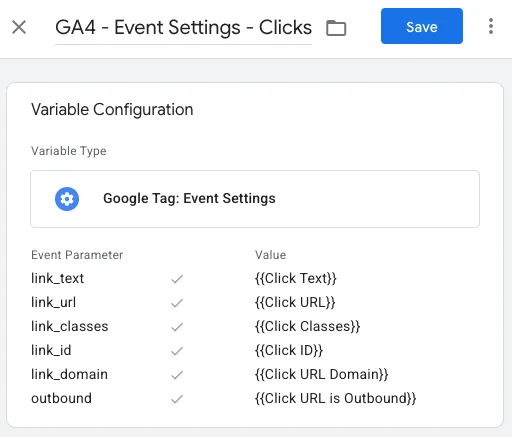
The first four parameters (link_classes, link_id, link_url, link_text)
use GTM’s built-in variables for their values. For the last two (link_domain,
outbound), you need to create new user-defined variables to bridge the gap.
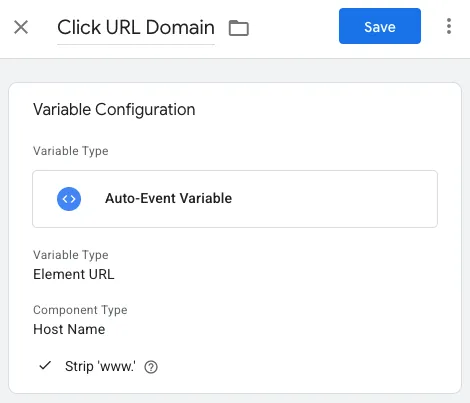
The link_domain variable is an Auto-Event Variable using the Element URL
variable type with Host Name as the component — with “Strip ‘www.’” checked so
that example.com and www.example.com normalize to the same value across all
your events.
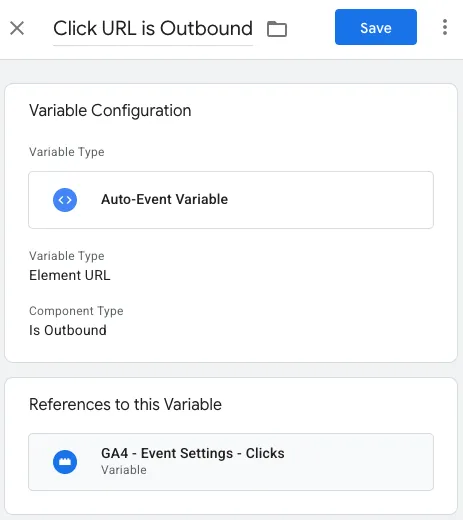
The outbound variable is also an Auto-Event Variable, using the Is Outbound
component type. This is the piece that lets you actually vary the outbound
parameter instead of it being hardcoded to true.
Draw the Rest of The Owl

Create a new GA4 event tag for the click event, select our new Event Settings
variable, and apply a trigger for all link clicks. Remember to go to your
Google tag’s enhanced measurement settings and turn off outbound clicks.
Creating New Events Scalably
Here’s another sample request that demonstrates the value of inheritance.
Someone reported on navigation menu clicks using the click event and applying
a filter for link_classes containing “nav.” Those elements also had a data
attribute that needed to be included, which required a new GA4 event, so they
asked you for help.
Creating a tag to capture a new event is much simpler now with inherited
parameters. You apply your Event Settings variable to handle the base
parameters and then add a row for your new nav_name parameter.
Your base click event parameters never change — they remain closed for modification while being open for extension.
Applying Inheritance to Event Names
To make inheritance crystal clear, my preference is to use the base event’s name and append a descriptor to it. This will naturally form a self-documenting hierarchical structure that clearly outlines inheritance like the following.
clickclick_navclick_nav_footerclick_nav_footer_cta
Shared Settings vs. Event Settings: Choosing the Right Layer
GTM actually gives you two layers of inheritance, and knowing which one to use is half the battle.
The Google tag’s shared event settings sit at the configuration level.
Anything defined there rides along with every event the tag sends —
page_view, your clicks, all of it. Event Settings variables, by contrast,
only apply to the event tags that explicitly opt in.
The rule of thumb: page-global context belongs at the Google tag level, and event-family parameters belong in Event Settings variables.
- Google tag shared settings:
environment,site_section, content grouping, user properties — things that are true of the page or the user regardless of what they’re doing. - Event Settings variable:
link_url,link_text,link_domain— things that only make sense for a particular family of events.
Override precedence follows the inheritance metaphor: the most-derived definition wins. A parameter row defined directly on a tag beats the same parameter in an Event Settings variable, which in turn beats the Google tag’s shared settings. That’s exactly the behavior you want — derived events can specialize, but they don’t have to.
The common trap is putting event-family parameters in the shared settings
because “everything should have them.” Do that with click parameters and every
page_view now carries empty or garbage link_url values. Keep each parameter
at the narrowest layer where it’s always meaningful.
Don’t Forget Custom Dimension Registration
Here’s the part that bites people after a flawless GTM implementation: your inherited parameters arrive in GA4 just fine, but they’re invisible in standard reports and Explorations until you register them as custom dimensions (Admin → Custom definitions).
The limits matter. A standard GA4 property gets 50 event-scoped and 25
user-scoped custom dimensions. This is where a disciplined taxonomy quietly
pays for itself: because your base parameters are shared, one registered
link_url dimension serves click, click_nav, and every other derived click
event. The “one tag per event type” approach tends to produce nav_url,
cta_url, and footer_url — three slots burned on the same concept.
One nuance: unregistered parameters aren’t lost. They still show up in DebugView and in the BigQuery export. Registration is purely about making them available to reports and Explorations — but if nobody can report on a parameter, it may as well not exist, so make registration part of your rollout checklist.
Naming Limits and the Event-vs-Parameter Tradeoff
The hierarchical naming convention has a hard ceiling: GA4 event names max out
at 40 characters (parameter names at 40, parameter values at 100), and a
property only tolerates 500 distinct event names before new ones stop being
created. click_nav_footer_cta is cute; four levels deeper and you’re
truncating.
Two defenses:
- Abbreviate with short, stable tokens.
click_nav_ftr_ctareads fine once the abbreviations are documented. Pick them once and never vary them. - Don’t subclass when a field will do. In inheritance terms, parameters
are inherited fields and event names are derived classes. Create a new event
name only when you’ll report on it as a distinct behavior; when you’re
describing a property of an existing behavior, add a parameter.
click_navwith anav_nameparameter beats mintingclick_nav_header_about_us— the latter fragments your reports, eats your 500-event budget, and tells you nothing a dimension filter couldn’t.
Deep hierarchies are a smell. If you find yourself three or four underscores in, the leaf levels almost certainly should have been parameters.
Benefits of This Approach
Consistency: All click events share the same base parameters, ensuring uniform data structure across your GA4 reports.
Maintainability: Need to add a new event parameter like
user_authenticated to all click events? Update one Event Settings variable
instead of dozens of tags.
Scalability: New event types require minimal GTM configuration since they inherit the existing foundation.
Documentation: Your Event Settings variables (and hopefully event names) serve as living documentation of your event taxonomy hierarchy.
Testing: Easier to test and validate since base parameters are centralized.
Implementation Checklist
- Audit Existing Events: Identify common parameters across event types.
- Design Inheritance Hierarchy: Map which events should inherit from which base schemas.
- Create Base Event Settings: Define your foundational parameter sets.
- Update GA4 Tags: Replace hardcoded parameters with Event Settings variables.
- Test Inheritance: Verify all expected parameters appear in GA4 DebugView.
- Register Custom Dimensions: Add shared base parameters as event-scoped custom dimensions in GA4.
- Document Taxonomy: Create clear documentation of your event inheritance structure.
Build Once, Scale Forever: The Future-Proof GTM Container
The open-closed principle transforms GTM from a collection of disparate tags into a cohesive event architecture. By using Event Settings variables as inheritance mechanisms, you create a scalable foundation that grows with your analytics needs and doesn’t require constant modifications to existing tracking.
Your base event schemas remain stable and reliable, while new requirements are handled through extension rather than modification. The result is a cleaner GTM container, more consistent data, and a sustainable approach to implementing enterprise-scale analytics.
Start small — identify one base event type in your current implementation and refactor it using Event Settings inheritance. You’ll quickly see how this pattern can revolutionize your GTM architecture, making your container easier to work with and simpler to understand.